We earn a commission from partner links on this site. This doesn’t affect our opinions or evaluations.
For businesses aiming to significantly enhance their digital footprint, a vibrant Facebook community can prove to be an invaluable asset.
Beyond offering opportunities to present additional value to your clientele via a consistent stream of informative and promotional materials, you are also providing entry into a highly beneficial, specialized support system. Collective insights, inquiries, and observations—these elements together can fuel conversations that ultimately stimulate expansion.
Nevertheless, a far more detrimental situation than lacking a community altogether is cultivating a substandard one; a space populated by unengaged individuals or malicious participants uninterested in genuine personal or professional advancement, instead exploiting your brand’s resources.
This is precisely where thoughtfully crafted Facebook group admission inquiries become exceptionally useful. By utilizing a predetermined set of queries aimed at assessing the genuine enthusiasm of a potential community participant, you can effectively screen out the majority of unsuitable applicants before they gain access.
Leveraging our collective expertise, we have developed this comprehensive primer to assist you in formulating excellent Facebook group entry questions, thereby safeguarding your community from unproductive interactions.
Are you prepared to begin? Let us proceed.
Precisely as the term implies, Facebook community admission inquiries are specific prompts an individual must respond to before gaining entry into a particular Facebook community.
These inquiries fundamentally differ from the established community protocols, which rather delineate the expected conduct once someone has already joined the group. Facebook community questions, therefore, represent a crucial element of a vetting system implemented prior to a prospective member’s approval—typically during the initial application.
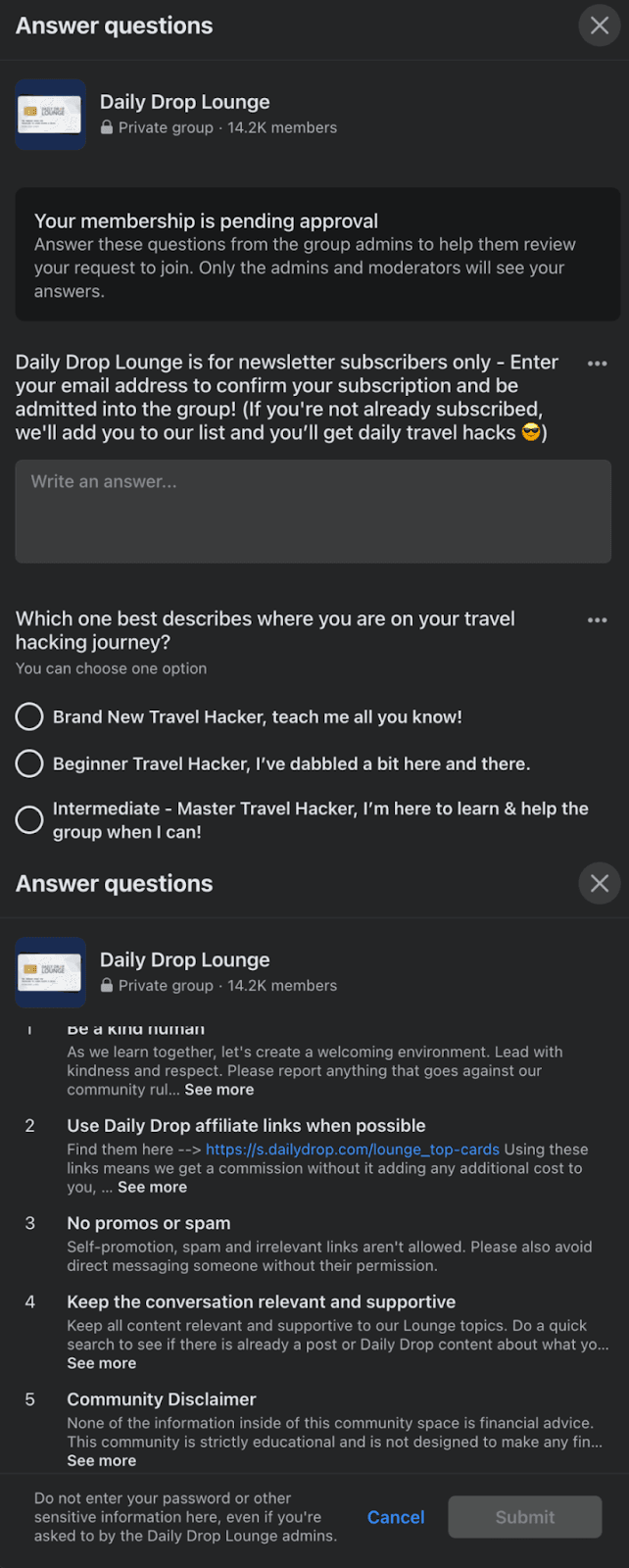
Observe that the illustration provided employs two distinct question formats: concise written responses and single-selection radio buttons. Facebook further facilitates a third question style alongside these, which is the multiple-choice alternative. This format is exceptionally well-suited for inquiries necessitating a singular response, for instance, pinpointing the method through which they discovered your community initially.
The specific formats of inquiries employed for your admission questions are not paramount: what holds significance is posing the necessary questions to ascertain the genuine engagement level of a prospective participant.
Astute Facebook community administrators will not merely utilize these question types for validating credentials; they’ll additionally leverage them for alternative objectives, such as nurturing potential leads. Consider the applicant screening procedure as an integral phase within the overall customer experience and creatively explore avenues to utilize this gathered intelligence.
Below are several excellent applications for your Facebook community admission inquiries:
It is quite probable that during the initial creation of your Facebook community, you encountered the choice to establish some entry questions; if not, accomplishing this is remarkably simple.
Initially, it is essential to verify you are operating under the correct user profile linked to the community you wish to oversee. Access the profile menu, typically found at the top right of your Facebook dashboard, and alternate profiles if needed.
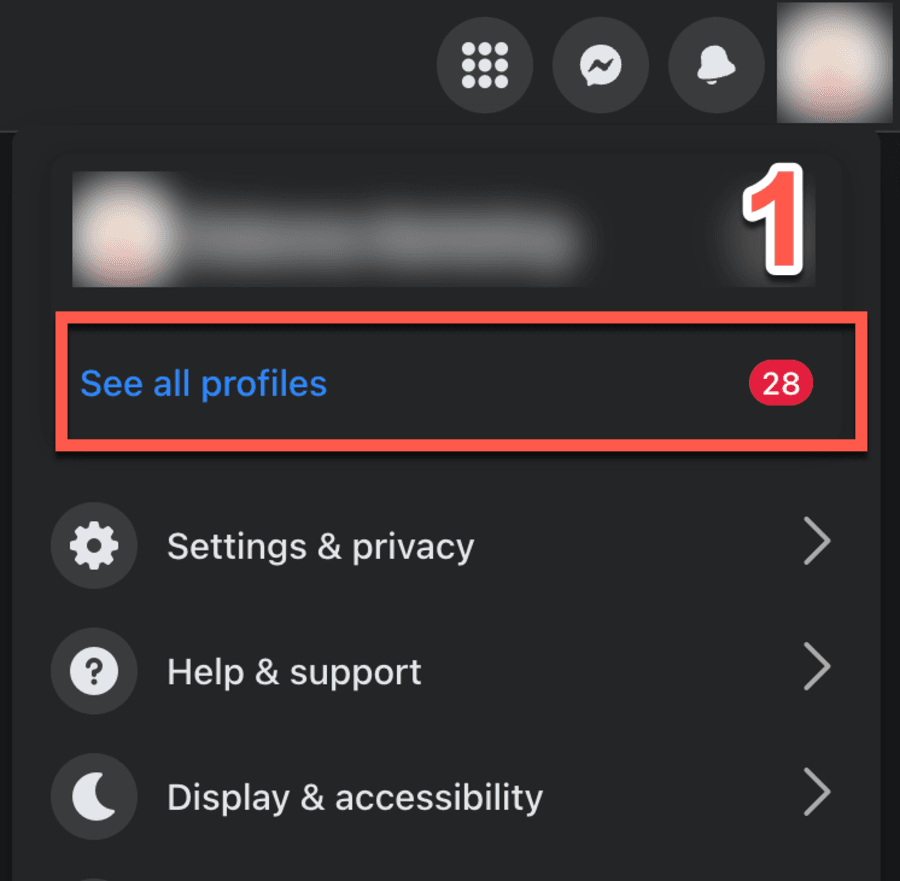
Following that, select “Groups” and then the particular community you wish to manage. Depending on your profile’s permission levels, several options might appear, so ensure you’ve selected the intended one.
Scan the right-hand portion of your group’s primary page, located just under the administrative header section. You ought to see a control labeled either “Membership questions” (characteristic of private groups) or “Participation questions” (typical for public groups).
Most communities you, as an online creator, will oversee are generally closed, so direct your search towards the “membership question” option.
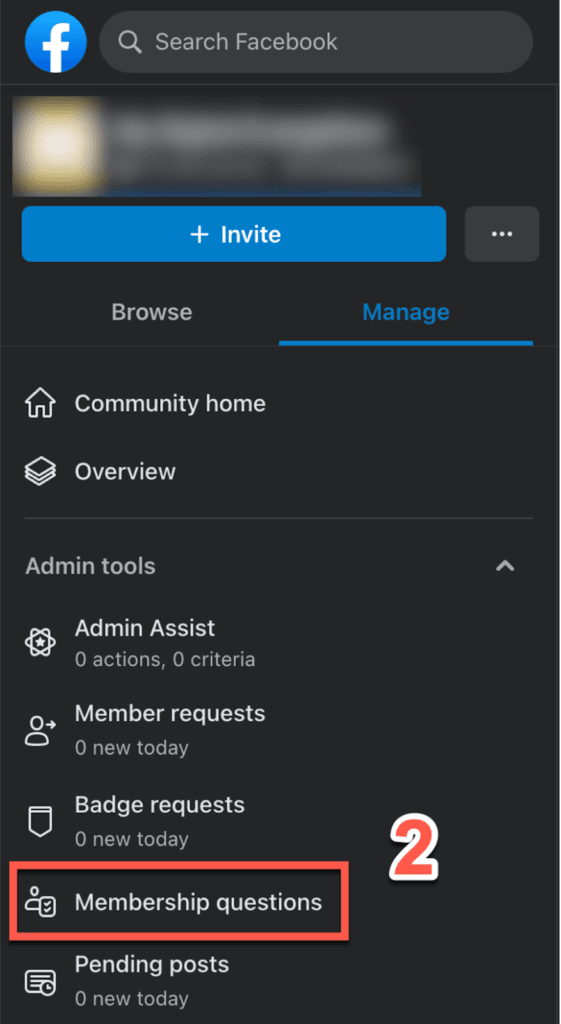
From that point, you have the capability to either compose entirely new inquiries for your Facebook communities or modify those already in place. You can also adjust or supplement the community guidelines listed below the questions, a step we strongly suggest. Select Save, and the initiation questions will be firmly established.

With your community’s expansion—and provided you’ve included a lead-generating query, like requesting members’ emails—you will accumulate a good amount of data. You will want to observe the most frequent responses and strive to integrate these into your market analysis.
Should you overlook transcribing the responses, you retain the ability to revisit and review the answers individuals submitted post-entry. Just select “members” from the upper menu, and a full listing of your Facebook community participants will be shown.
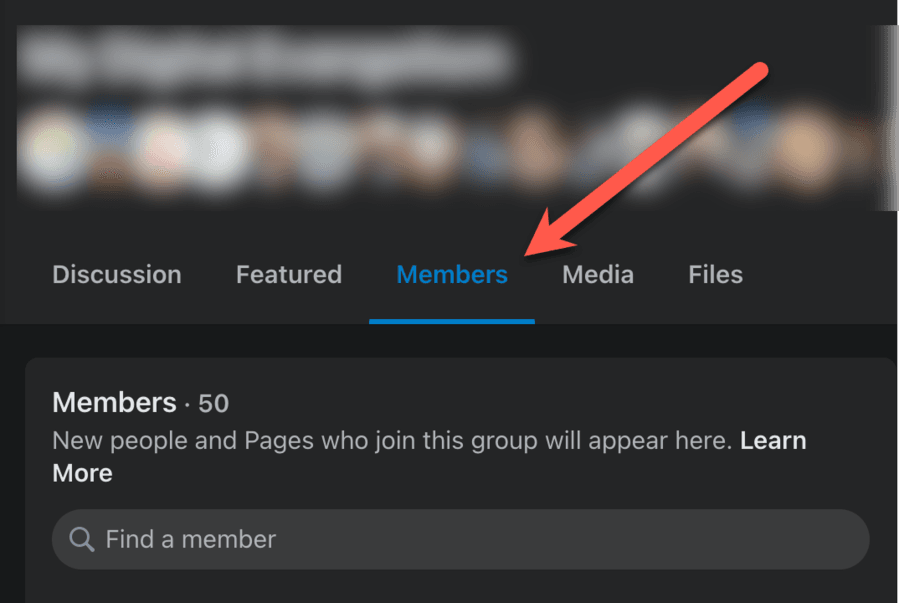
Kindly select the group participant whose information you wish to review, and this will promptly display their dedicated “Member summary” page. Towards the page’s conclusion, a button designated “Membership questions” is available; interact with it to view the responses to your Facebook group entry queries.
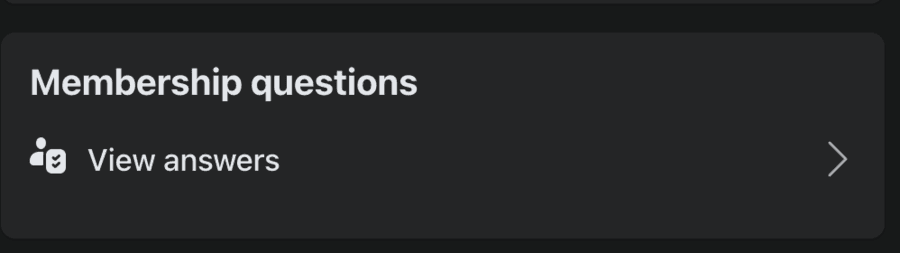
As previously highlighted, a significant application for this utility involves enlarging your present email compilation. Because participants are required to provide answers before their group admission, it offers a direct avenue for cultivating new prospects.
Moreover, because these prospects are already warmed up (having previously indicated engagement with your brand, naturally), you can be certain of their superior caliber.
Transferring those prospective contacts into your email platform is essential, yet if time is limited—or you prefer to avoid the hassle—a service like GroupLeads is notably useful.
Differing from numerous SaaS platforms that necessitate a cumbersome installation and extensive setup, GroupLeads employs a convenient Chrome extension that connects your email service directly to your Facebook group.
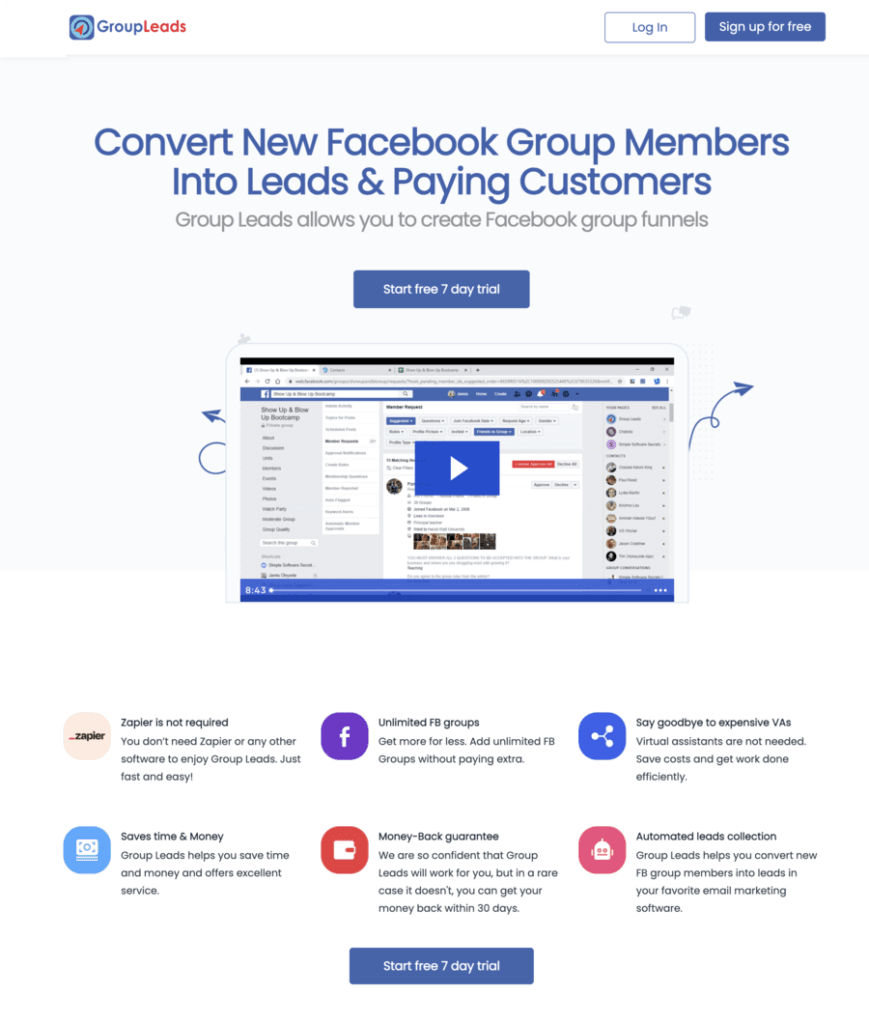
GroupLeads facilitates a straightforward, single-click installation, implying that your only task is to navigate to the member requests area on your Facebook page, select “Approve All,” and consequently, all your prospects—along with their associated information—will be seamlessly transferred to your designated email service. Furthermore, their entire history is securely maintained and remains available for export whenever needed.
Streamlining processes through automation is paramount if your intention is to generate revenue from your Facebook group. In the event Facebook faces insolvency or expels you from their platform, you will possess a tangible record of your member data, ready for re-upload to a different service.
Indeed, relocating your group away from Facebook could be a future consideration. Although Facebook groups represent the most readily available platform for managing communities, they are by no means the sole option available. Alternative platforms often provide enhanced functionalities and greater capacities, allowing you to fully realize your community’s possibilities and customize it extensively.
The majority of group administrators tend to overlook the member inquiry feature within their Facebook communities. Alternatively, when they do utilize it, their main focus often rests on identifying automated accounts and ensuring group safety: excluding undesirable participants from the group and permitting entry only to individuals who are likely to make meaningful contributions.
Nevertheless, it’s crucial not to undervalue this procedure by posing generic or uninspired inquiries. Invest a period for careful consideration to formulate questions designed to guide your prospective member further along their engagement path and simultaneously benefit your brand’s objectives.
Presented underneath are several expert suggestions to keep in mind as you develop your inquiries.
It is probable that you possess a fairly clear comprehension of your intended viewership—at minimum in a broad context. Thoughtfully crafted inquiries can significantly assist you in refining that comprehension, enabling a more detailed acquisition of your demographic particulars.
To illustrate, if your educational program is structured for real estate professionals, you might currently employ a question that determines their principal engagement in either residential or commercial property. While these two segments share commonalities, your content strategy may benefit from adjustments based on the distinct characteristics of your group members.
A Facebook community serves as more than just a standalone entity; it presents a chance for you, the Facebook group administrator, to categorize your participants and develop worthwhile prospects for additional offerings for your benefit.
Although it might not serve as the most robust filtering inquiry, you have the option to pose a question such as, “Are you aware that our brand provides [insert specific service or product here]?” Should they be uninformed, direct them to a link containing further details.
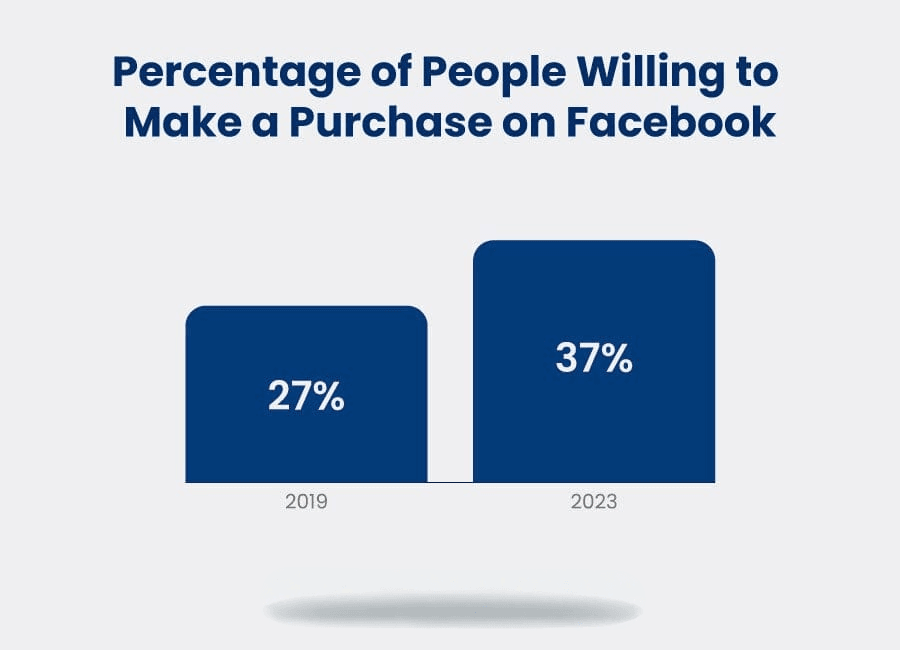
Additionally, you might inquire whether prospective members would like to experience a complimentary trial of your offering or service. Upon receiving an affirmative reply, furnish them with a designated landing page where they can input the necessary information. Individuals currently exhibit a greater tendency to complete purchases via Facebook compared to several years prior, so ensure you capitalize fully on this situation.
As a fundamental practice, it is advisable to gather email addresses and then meticulously organize them using diverse classifications (such as their initial point of contact, degree of expertise, prior purchasing patterns, or analogous information).
Avoid merely consolidating these contacts into a single, comprehensive list; instead, ensure they are placed within appropriate classifications which will facilitate the distribution of tailored communications at a future time.
While some questions might be slightly open, confidently present more direct inquiries. Prompt users to select between one option or another, even if it seems a little simplistic.
This approach serves two key functions. To begin, it simplifies the completion of membership questions for the user as they avoid needing to formulate a response, and secondly, it permits you to shape the potential answers to your specific requirements.
If you operate a marketing agency, for instance, it could be beneficial to understand which traffic generation methods your audience is most keen to explore, be it paid or organic. By posing this question directly, you secure a reliable stream of insights into what your audience desires and requires.
Facebook permits you to present a maximum of three inquiries to individuals seeking membership, so it is crucial to ensure that every single one is significant—especially considering that one question will probably be designed for lead acquisition.
Refrain from the impulse to formulate leading questions that are merely extensions of one another. Juxtapose an inquiry that ascertains their method of discovery (“how did you come across our group?”) with an inquiry that probes their anticipated outcomes (“what are you hoping to achieve or understand from joining this group?”).
Facebook fundamentally operates as a medium centered around dialogue. This implies that when individuals join your group, their intention is to actively participate with the community, rather than remaining passive observers.
The latest Facebook data substantiates this finding. An overwhelming 98% of group participants report experiencing a strong sense of community connection within their Facebook group and rely on fellow members for encouragement and understanding.
This positions Facebook significantly ahead in terms of establishing and nurturing online communities. While alternative platforms such as Slack and Discord are also capable of cultivating a communal atmosphere, individuals consistently turn to Facebook to discover groups where they can actively contribute.
How does this relate to your Facebook membership inquiries? Simply put: profoundly.
An insightful question during the application procedure communicates to the prospective group member the fundamental nature of the group. A question that invites varied or strong opinions indicates that this community addresses challenging topics (a characteristic they may or may not find appealing).
Nevertheless, soliciting their perspective on a sensitive matter from the beginning—even if limited to a concise response—initiates their routine engagement with such inquiries going forward.
Presented underneath are two distinct compilations: the first pertains to filtering inquiries for your Facebook community, while the second is designed to assist with prospect development. You are welcome to combine elements from these lists or devise your own inquiries based on the suggestions provided below.
Remember also to conduct A/B testing on them. Should the information you gather from your current questions not meet your expectations, revise your approach and experiment with alternative inquiries.
The essence of potent marketing lies in fully capitalizing on every available avenue, and the membership inquiries for your online community represent one such significant prospect.
Through a touch of ingenuity, you can formulate the ideal combination of questions that nurtures your enterprise and actively involves your community members!
Now, we invite your contribution: which community questions have you previously observed that struck you as exceptionally potent? Please feel free to post them in the comment section provided!
Below are some common questions we get concerning Facebook group membership questions.
Absolutely, and you should. The best way to make sure you keep bots and bad members out of your group is by forcing real responses to real questions.
You can find the answers to all of your group questions by clicking on the individual member under the “Members” tab on your group.
To add membership questions to your Facebook group, look under “Admin tools” on your group. You must be an admin of the group to add or edit them.

Aleesha Brigham works as a tester and reviewer at sellingonlinecoursesguide.com, where she meticulously evaluates online course platforms, tools, and strategies. Her detailed testing and reviews provide valuable insights that help course creators make informed decisions about their online education businesses.
Aleesha Brigham works as a tester and reviewer at sellingonlinecoursesguide.com, where she meticulously evaluates online course platforms, tools, and strategies. Her detailed testing and reviews provide valuable insights that help course creators make informed decisions about their online education businesses.

We respect your privacy and will never spam you.